Homework 1
COMS4732: Computer Vision 2
Images of the Russian Empire:
Colorizing the Prokudin-Gorskii photo collection
Due Date: Thursday, February 5 at 11:59 PM EST
Background
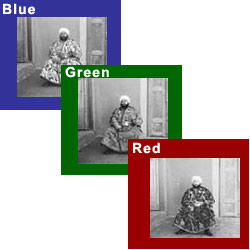
Sergei Mikhailovich Prokudin-Gorskii (1863-1944) [Сергей Михайлович Прокудин-Горский, to his Russian friends] was a man well ahead of his time. Convinced, as early as 1907, that color photography was the wave of the future, he won Tzar’s special permission to travel across the vast Russian Empire and take color photographs of everything he saw including the only color portrait of Leo Tolstoy. And he really photographed everything: people, buildings, landscapes, railroads, bridges… thousands of color pictures! His idea was simple: record three exposures of every scene onto a glass plate using a red, a green, and a blue filter. Never mind that there was no way to print color photographs until much later – he envisioned special projectors to be installed in “multimedia” classrooms all across Russia where the children would be able to learn about their vast country. Alas, his plans never materialized: he left Russia in 1918, right after the revolution, never to return again. Luckily, his RGB glass plate negatives, capturing the last years of the Russian Empire, survived and were purchased in 1948 by the Library of Congress. The LoC has recently digitized the negatives and made them available on-line.
Overview
The goal of this assignment is to take the digitized Prokudin-Gorskii glass plate images and, using image processing techniques, automatically produce a color image with as few visual artifacts as possible. In order to do this, you will need to extract the three color channel images, place them on top of each other, and align them so that they form a single RGB color image. This is a cool explanation on how the Library of Congress composed their color images.
Some starter code is available in Python; do not feel obligated to use it. We will assume that a simple x,y translation model is sufficient for proper alignment. However, the full-size glass plate images (i.e. .tif files) are very large, so your alignment procedure will need to be relatively fast and efficient. When you begin your naive implementation, you should start with the smaller files monastery.jpg and cathedral.jpg provided, or by downsizing the larger files. Your submission should be ran on the full-size images.
Details
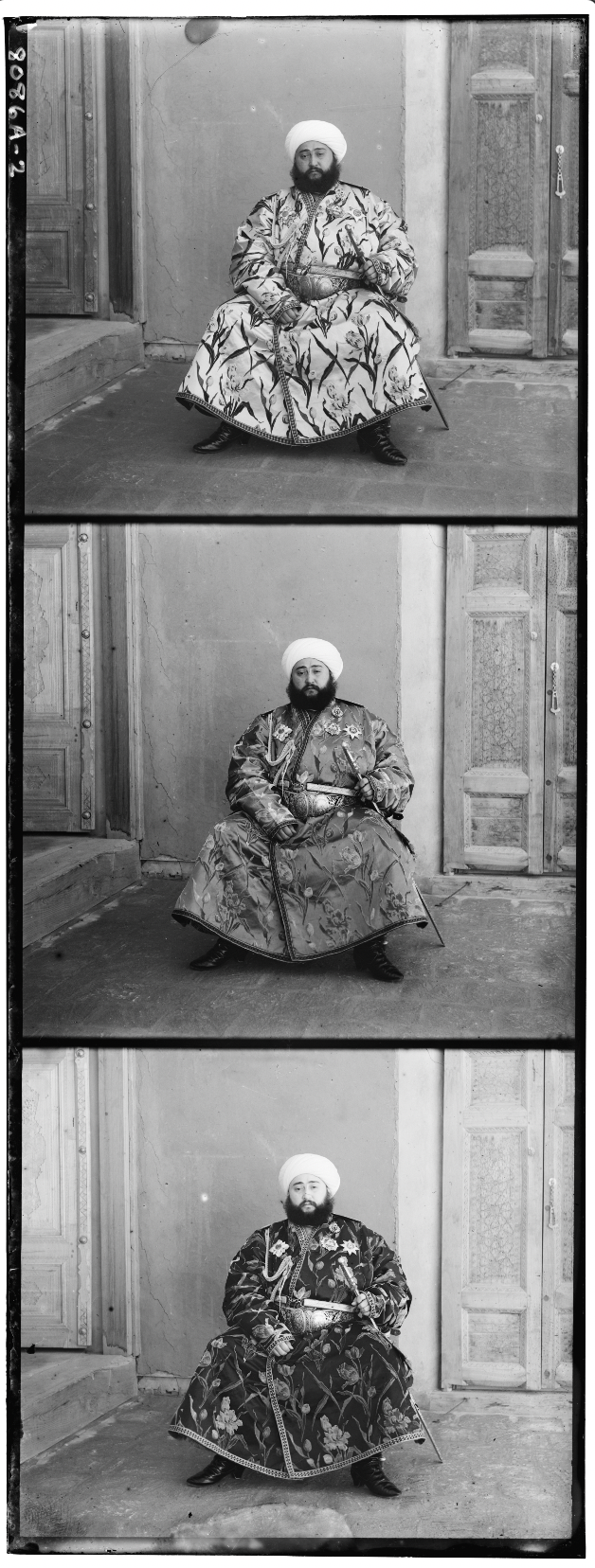
A few of the digitized glass plate images (both hi-res and low-res versions) will be placed in the following zip file (note that the filter order from top to bottom is BGR, not RGB!): data.zip (online gallery for preview).
Your program will take a glass plate image as input and produce a single color image as output. The program should divide the image into three equal parts and align the second and the third parts (e.x. G and R) to the first (B). For each image, you will need to print the (x,y) displacement vector that was used to align the parts.
Simple Alignment
The easiest way to align the parts is to exhaustively search over a window of possible displacements (say [-15,15] pixels), score each one using some image matching metric, and take the displacement with the best score. There is a number of possible metrics that one could use to score how well the images match. The simplest one is just the L2 norm also known as the Euclidean Distance which is simply \(\sqrt{\sum_{u,v} (I_1(u,v) - I_2(u,v))^2}\) where the sum is taken over all pixels \((u,v)\) in the images. Another is Normalized Cross-Correlation (NCC), which is simply a dot product between two normalized vectors: \(\frac{\text{image1}}{\|\text{image1}\|}\) and \(\frac{\text{image2}}{\|\text{image2}\|}\).
Multi-Resolution Pyramid Alignment
Exhaustive search will become prohibitively expensive if the pixel displacement is too large (which will be the case for high-resolution glass plate scans). In this case, you will need to implement a faster search procedure such as an image pyramid. An image pyramid represents the image at multiple scales (usually scaled by a factor of 2) and the processing is done sequentially starting from the coarsest scale (smallest image) and going down the pyramid, updating your estimate as you go. It is very easy to implement by adding recursive calls to your original single-scale implementation. You should implement the pyramid functionality yourself using appropriate downsampling techniques.
Your job will be to implement an algorithm that, given a 3-channel image, produces a color image as output. Implement a simple single-scale version first, using for loops, searching over a user-specified window of displacements. The above directory has skeleton Python code that will help you get started and you should pick one of the smaller .jpg images in the directory to test this version of the code. Next, add a coarse-to-fine pyramid speedup to handle large images like the .tif ones provided in the directory.
Performance Improvements (part of bells & whistles): note that in the case like the Emir of Bukhara (shown on right), the images to be matched do not actually have the same brightness values (they are different color channels), so you might have to use a cleverer metric, or different features than the raw pixels. The standard approach that worked for the other images likely will not suffice for this image. This image is a great candidate for a Bells & Whistles extension if you want to explore more advanced alignment strategies or heuristics. Additionally, some scenes containing people may struggle to be aligned properly due to them moving between frames. You could try using common objects as an anchor to align these images (also bells & whistles).
However, for grading, we allow up to one image (out of the original 14, excluding your own) to be misaligned in your final results; aim to get the rest properly aligned (see grading breakdown below).
Bells & Whistles (Optional)
Although the color images resulting from this automatic procedure will often look strikingly real, they are still a far cry from the manually restored versions available on the LoC website and from other professional photographers. Of course, each such photograph takes days of painstaking Photoshop work, adjusting the color levels, removing the blemishes, adding contrast, etc. Can we make some of these adjustments automatically, without the human in the loop?
- Automatic cropping. Remove white, black or other color borders. Don’t just crop a predefined margin off of each side – actually try to detect the borders or the edge between the border and the image.
- Automatic contrasting. It is usually safe to rescale image intensities such that the darkest pixel is zero (on its darkest color channel) and the brightest pixel is 1 (on its brightest color channel). More drastic or non-linear mappings may improve perceived image quality.
- Automatic white balance. This involves two problems – 1) estimating the illuminant and 2) manipulating the colors to counteract the illuminant and simulate a neutral illuminant. Step 1 is difficult in general, while step 2 is simple (see the Wikipedia page on Color Balance and section 2.3.2 in the Szeliski book). There exist some simple algorithms for step 1, which don’t necessarily work well – assume that the average color or the brightest color is the illuminant and shift those to gray or white.
- Better color mapping. There is no reason to assume (as we have) that the red, green, and blue lenses used by Produkin-Gorskii correspond directly to the R, G, and B channels in RGB color space. Try to find a mapping that produces more realistic colors (and perhaps makes the automatic white balancing less necessary).
- Better features. Instead of aligning based on RGB similarity, try using gradients or edges.
(Optional) Feel free to come up with your own approaches. There is no right answer here – just try out things and see what works. For example, the borders of the photograph will have strange colors since the three channels won’t exactly align. See if you can devise an automatic way of cropping the border to get rid of the bad stuff. One possible idea is that the information in the good parts of the image generally agrees across the color channels, whereas at borders it does not.
- Better transformations. Instead of searching for the best x and y translation, additionally search over small scale changes and rotations. Adding two more dimensions to your search will slow things down, but the same course to fine progression should help alleviate this.
- Aligning and processing data from other sources. In many domains, such as astronomy, image data is still captured one channel at a time. Often the channels don’t correspond to visible light, but NASA artists stack these channels together to create false color images. For example, this tutorial on how to process Hubble Space Telescope imagery yourself. Also, consider images like this one of a coronal mass ejection built by combining ultraviolet images from the Solar Dynamics Observatory. To truly show that your algorithm works, you should demonstrate a non-trivial alignment and color correction that your algorithm found.
Deliverables
For this assignment, you must submit both your code and a webpage written as an index.html with pointers to images/assets. You must also submit a README.md file that outlines how to run your code. Lastly, submit a PDF version of your webpage.
The webpage is your presentation of your work. Imagine that you are writing a blog post about your work for your friends. A good blog post is easy to read and follow, well organized, and visually appealing.
When you introduce new concepts or tricks that improve your results, briefly explain them along the way and show the improved results of your algorithm on example images.
Below are the specific deliverables to keep in mind when writing your webpage.
- The results of a single-scale alignment (using NCC/L2 norm metrics) on the low-resolution images (JPEG files). List the offsets you comptuted for each image.
- The results of a multi-scale pyramid alignment (using NCC/L2 norm metrics) on all of our examples (in the data .zip file). List the offsets you computed for each image.
- The results of your algorithm (using NCC/L2 norm metrics) on at least 3 examples of your choosing, downloaded from the Prokudin-Gorskii collection.
- If your algorithm failed to align any image, provide a brief explanation of why.
- Describe any bells and whistles you implemented.
Important: Do not upload image files (e.g., .jpg, .png, .tif). This keeps submissions small and avoids hitting Gradescope’s 100 MB upload limit, which large image sets can easily exceed. We will run your code with pointers to the original full size images.
Final Advice
- Implement almost everything from scratch. It’s fine to use functions for reading, writing, resizing, shifting, and displaying images (e.g., imread, imresize, circshift), but don’t use high‑level functions for Laplacian/Gaussian pyramids, automatic alignment, etc. If in doubt, ask on Ed.
- Aim for under 1 minute per image. If it takes hours, optimize.
- Vectorize/parallelize and avoid many for‑loops. See Python performance tips and NumPy broadcasting: Python · NumPy Broadcasting.
- Use a fixed set of parameters; don’t over‑tune per image. One failure is okay with simple metrics.
- Convert images to floats and the same scale (e.g., im2double/im2uint8). JPGs are uint8; TIFFs may be uint16.
- Shift arrays with
np.roll. - Ignore borders when scoring; compute metrics on interior pixels.
- Save outputs as JPG to reduce disk/submission size usage.
Grading Rubric
This assignment will be graded out of 100 points, as follows:
Single-scale alignment (60 points total)
For results:
- +50%: No alignment defects on "cathedral," "monastery," "tobolsk." (Assume single‑scale is satisfied if pyramids work.)
- +30%: Some defects on "cathedral," "monastery," "tobolsk."
- 0%: No effort on alignment.
For presentation:
- +50%: Results cleanly presented. All requested images shown.
- +30%: Results cleanly presented. Not all requested images shown.
- +20%: Results not presented cleanly, formatted poorly.
- 0%: No results presented.
Multi-scale pyramid alignment (with NCC / L2) (40 points total)
For results:
- +50%: Alignment defects on ≤ 1 / 14 images.
- +40%: Alignment defects on ≤ 3 / 14 images, or missing.
- +30%: Alignment defects on ≤ 6 / 14 images, or missing.
- +20%: Alignment defects on > 6 / 14 images, but effort shown.
- 0%: No effort on alignment.
For presentation:
- +50%: Results cleanly presented. All requested images shown.
- +30%: Results cleanly presented. Not all requested images shown.
- +20%: Results not presented cleanly, formatted poorly.
- 0%: No results presented.
Important: We will also deduct points if submission instructions are not followed.
Common Questions
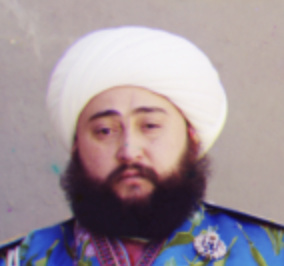
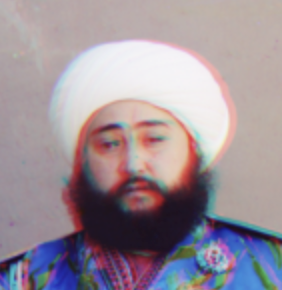
Q: What’s considered a good alignment vs. a bad alignment?
Since one failure is allowed while still receiving full credit for alignment, aim for strong results on most images (with a few failures) rather than acceptable-but-mediocre results on all images.
| Okay | Not Okay |
|---|---|
 |  |
Q: What if I used a better distance function beyond L2 and NCC to get better alignments?
That’s great and encouraged. However, to receive full credit you must still document results using the basic distance functions (L2/NCC). If you skip this, your presentation score will be penalized.
Acknowledgements
This assignment is based on Alyosha Efros’s version at Berkeley.